The short version
The best video harness depends less on the model and more on the film you ask for. Across nearly 300 blind votes and over 600 agent builds on Video Arena in two weeks, the same model produced films people preferred or rejected depending on length, format, and how much text the film carried.
Three findings carry most of the story:
- Length decides the winner. Past a minute, voters pick Remotion in 31 of 44 decided battles. Between 30 seconds and a minute, HyperFrames wins 34 of 55.
- Being new costs time and money. HyperFrames builds spend 7.4 minutes reading docs against 3.9 for Remotion, and cost about a quarter more.
- Motion shines on the right films. Mosaic's video agent trails overall, but is close to even on vertical and text-led films.
How a battle works
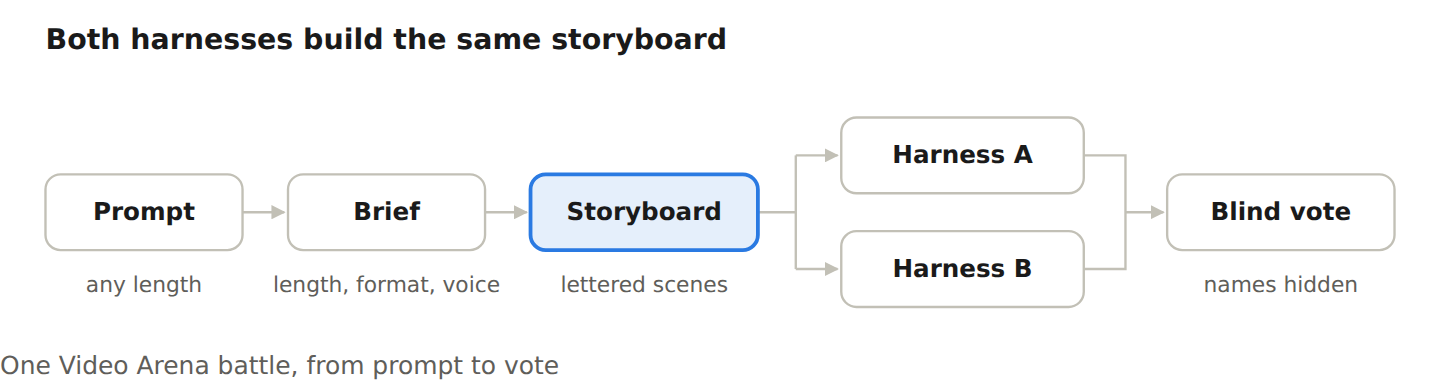
A planning model turns a person's prompt into a brief and a lettered storyboard. Two harnesses then build that same storyboard, each with 45 minutes. The person watches both films without knowing which harness made which, then picks one, calls a tie, or says both are bad.
| Harness | How it makes a film |
|---|---|
| Remotion | Writes the film as React code |
| HyperFrames | Writes the film as HTML, CSS and GSAP |
| Motion | Makes the film end to end as its own product |
After the vote, people can keep editing the winning film and download it. That post-vote behaviour turned out to be as revealing as the votes themselves.
The scoreboard
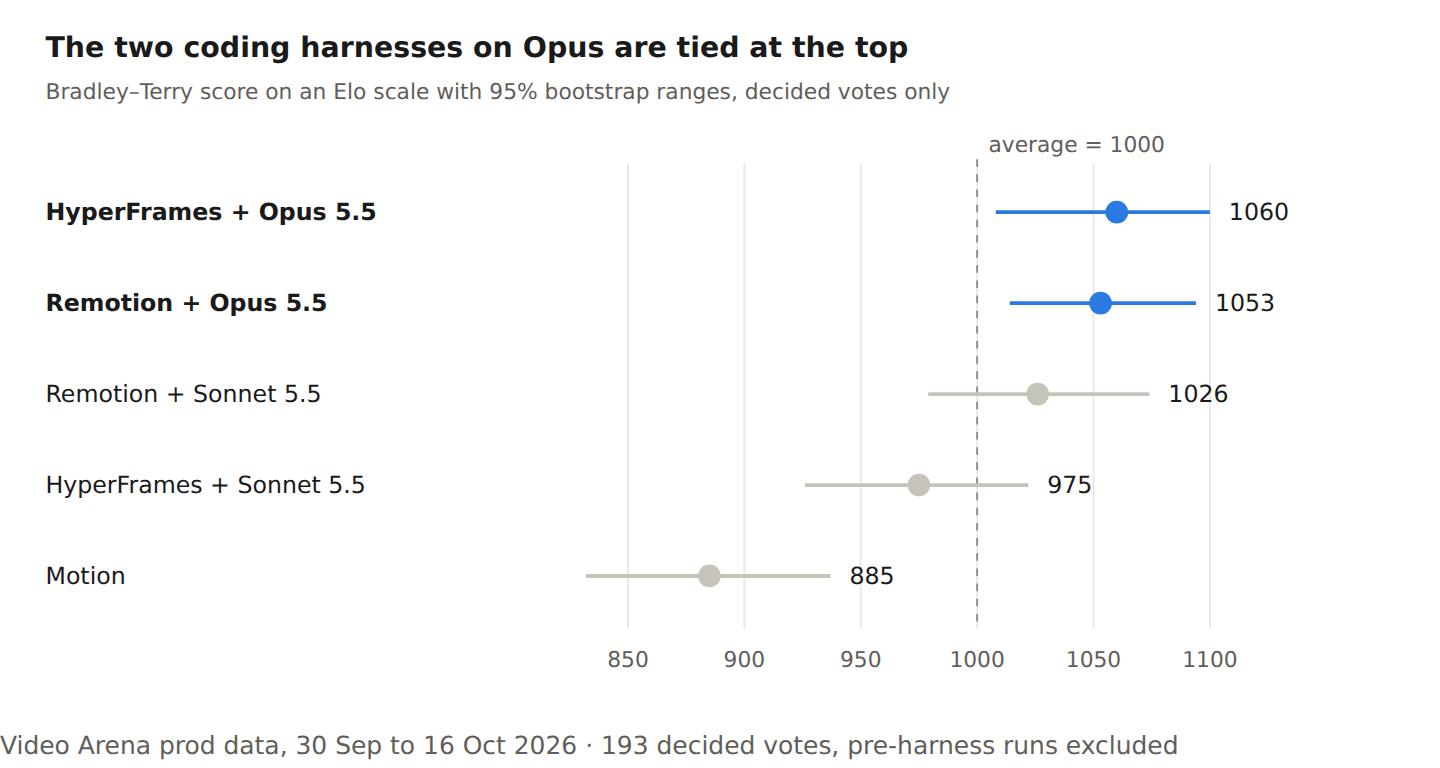
On Opus 5.5, the two coding harnesses are statistically tied. Scores come from a Bradley–Terry fit to 193 decided votes on an Elo scale (1000 = average), with 95% ranges from 300 bootstrap resamples.
The overall tie hides the interesting part. Split the battles by what was asked for, and clear preferences appear.
1. Length decides the winner
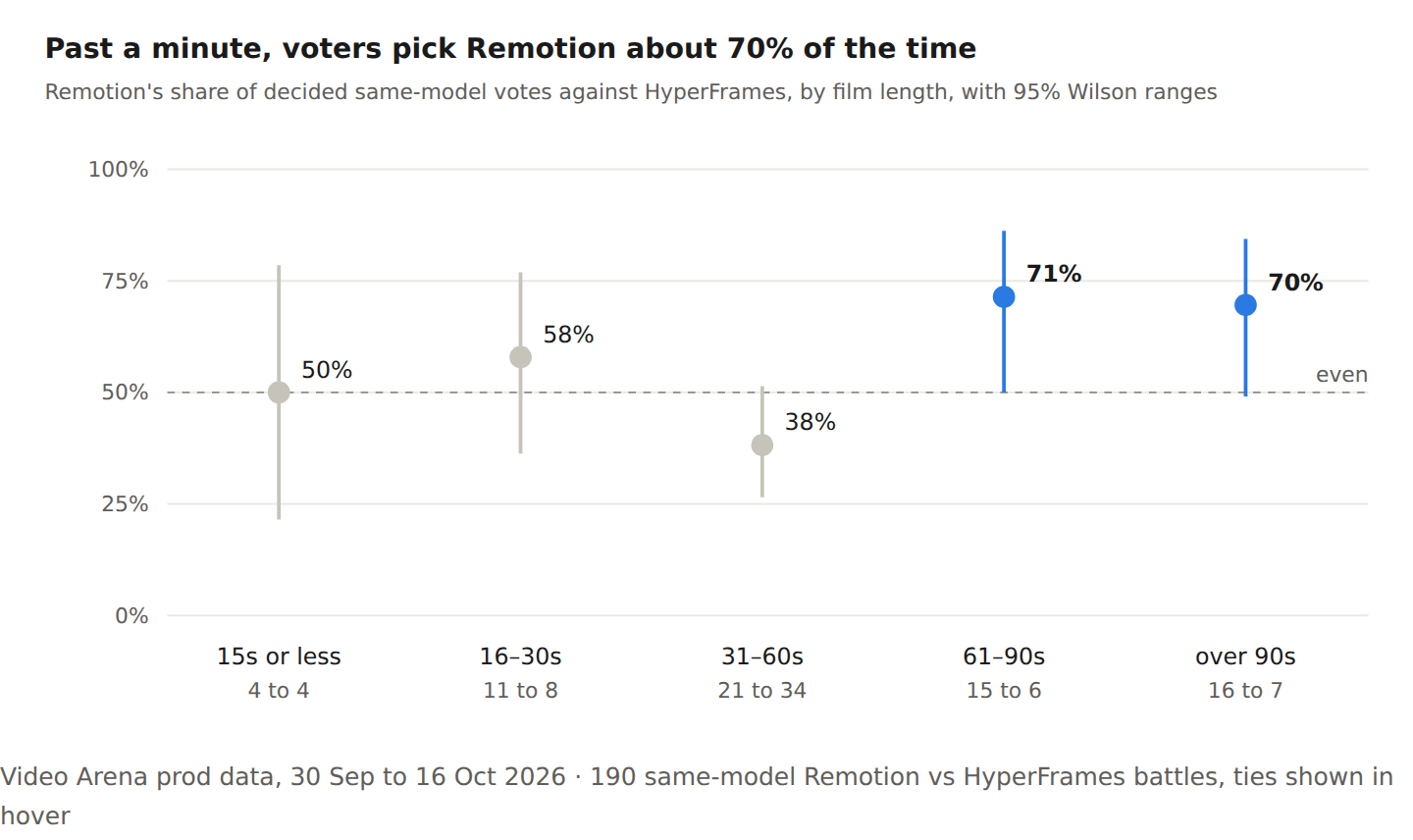
Past a minute, voters pick Remotion about 70% of the time (31 to 13, p≈0.01, sign test). Between 30 seconds and a minute, the preference flips to HyperFrames (34 to 21, p≈0.10), and under 30 seconds it's close to a coin flip. These are same-model battles, so the difference is the harness, not the model.
Why long films go to Remotion
The agent logs point to two habits. First, models know React well, so a Remotion agent opens the docs a couple of times and then builds. Second, it splits a long film into roughly a dozen scene files and works through them one at a time, which keeps each piece small enough to get right.
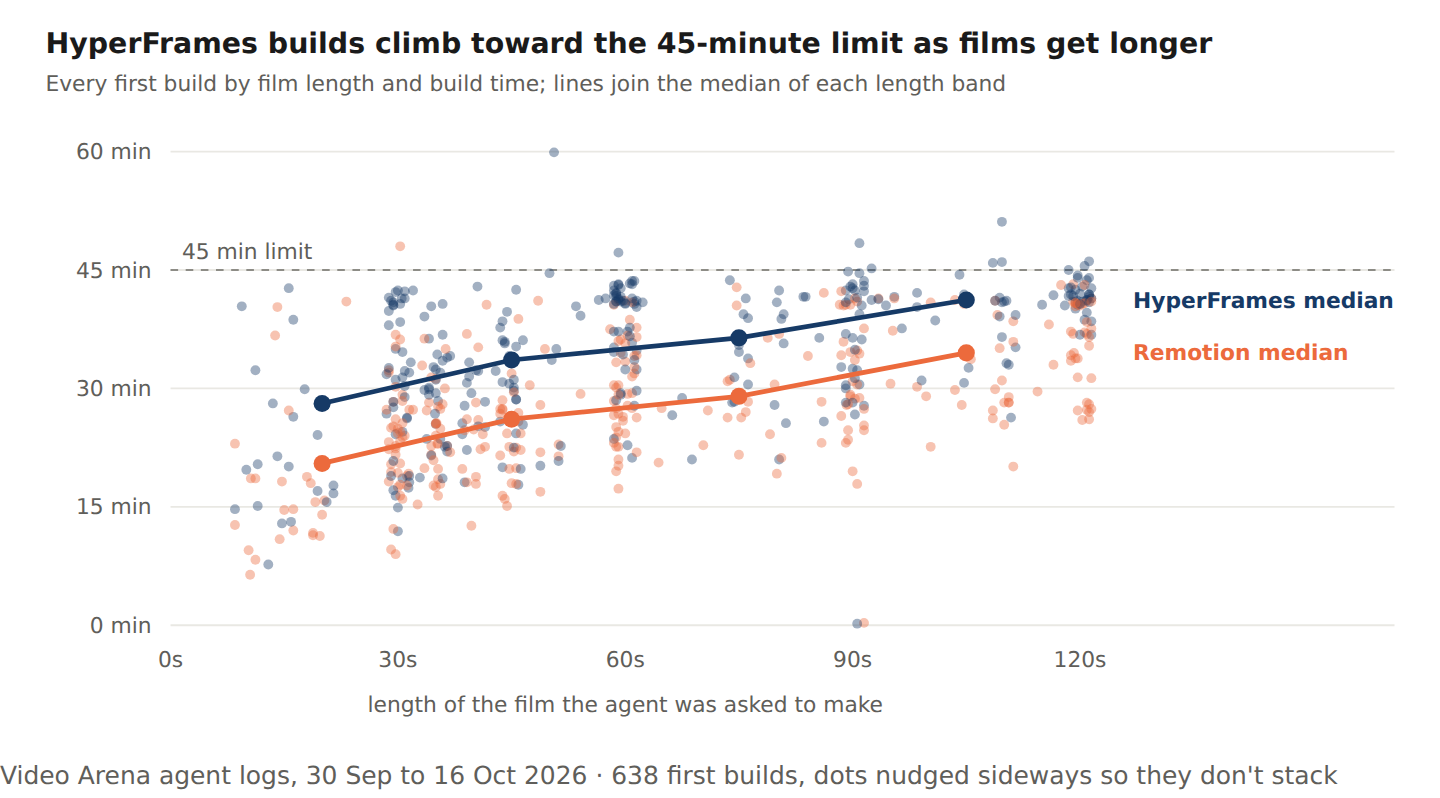
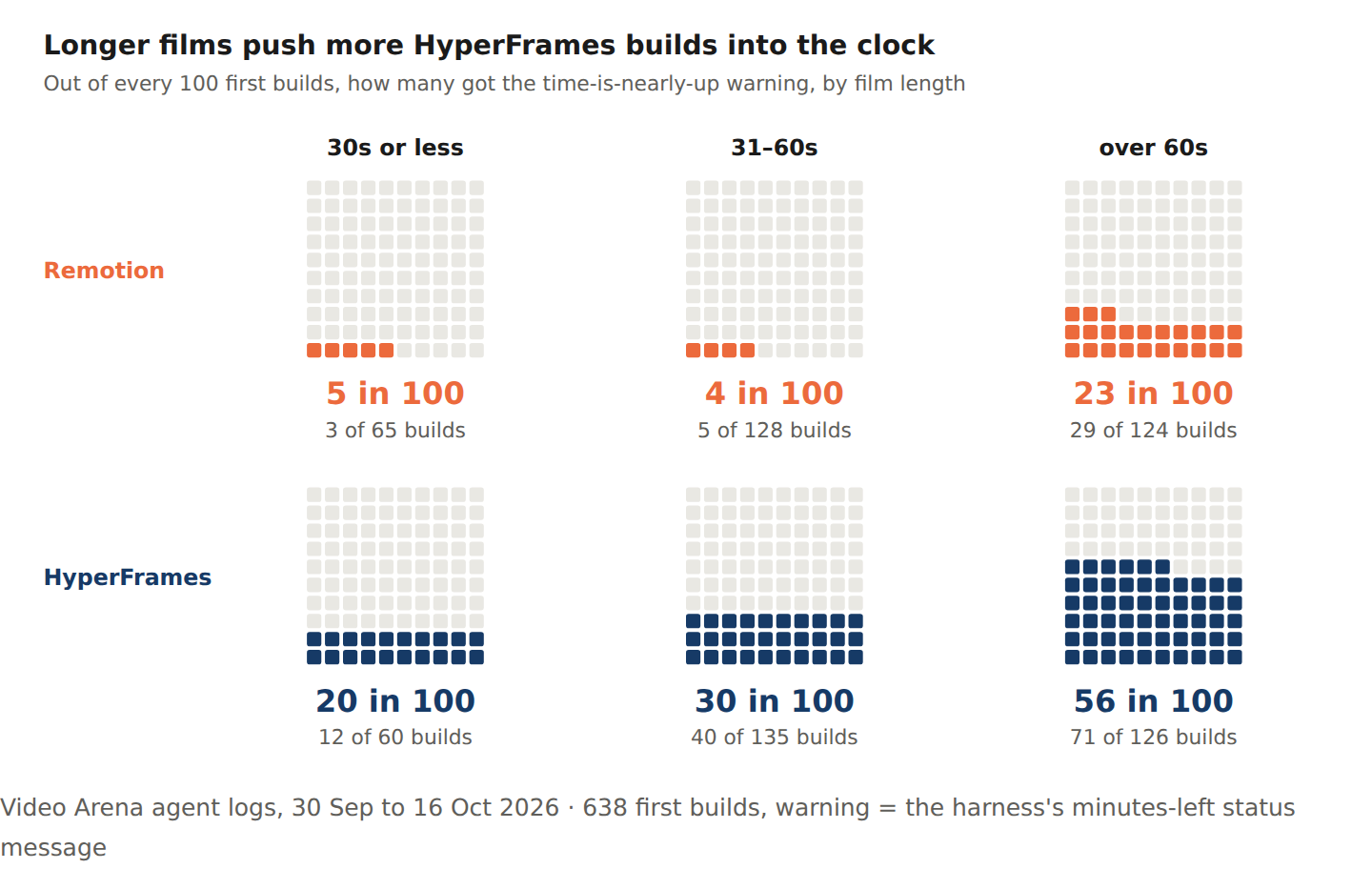
HyperFrames agents, by contrast, run into the clock. On films over 90 seconds, 50 of 67 HyperFrames builds ran past 40 minutes of their 45-minute budget, against 19 of 67 for Remotion. On films over a minute, 56 in 100 HyperFrames builds got the time-nearly-up warning, against 23 in 100 for Remotion.
Why 30–60 second films go to HyperFrames
At this length, HyperFrames agents seem to put more into each film. They work longer and look at more stills of their own film before calling it done. At this length the extra effort mostly fits inside the budget; over a minute, it often doesn't.
That checking catches real problems. One agent decided its film looked like flat clip-art and repainted it; another caught the tail of a "g" being clipped by a wipe.
Running out of time is not automatically fatal, though. HyperFrames builds that hit the clock still went 20 to 19 in their votes.
2. The cost of being new
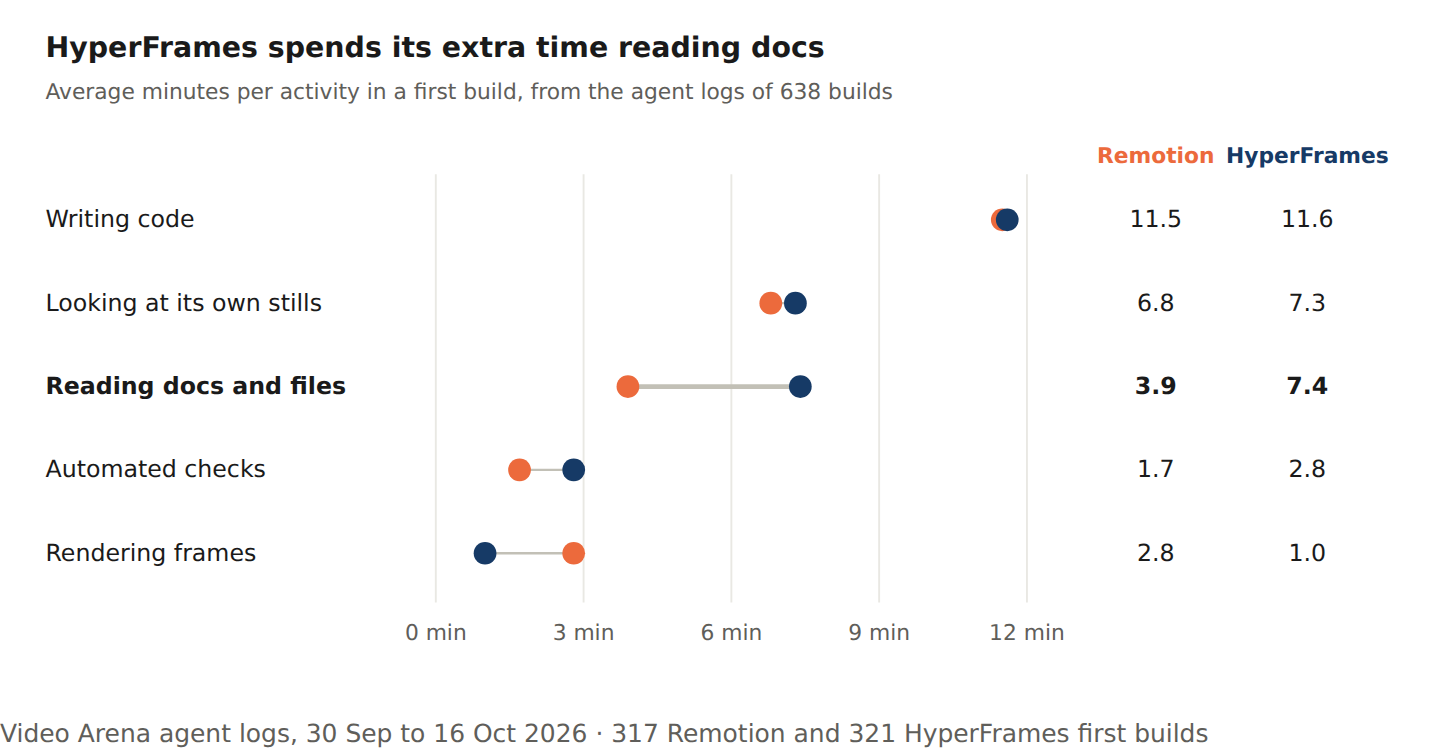
A HyperFrames build takes several minutes longer than a Remotion one, and most of that gap is reading and checking, not writing. Writing code takes the same 11.5 minutes on both.
HyperFrames agents spend 7.4 minutes per build in docs and files, against 3.9 for Remotion. They open the framework's skill files about four times per build, twice as often, and spend 2.8 minutes on automated checks against 1.7. That makes sense: models have seen an enormous amount of React, and HyperFrames is new, so the agent looks things up as it goes.
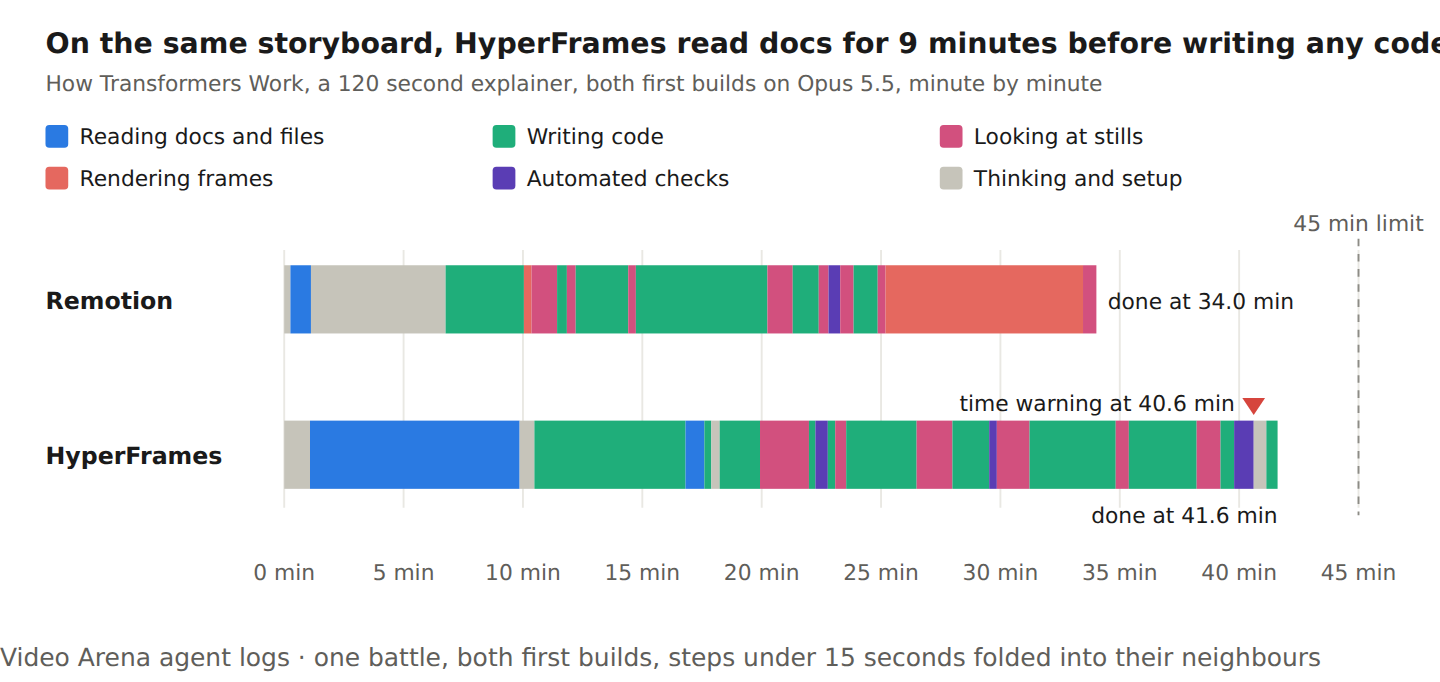
One real pair shows it clearly. On a two-minute How Transformers Work explainer, both on Opus 5.5, the HyperFrames agent read docs for almost 9 minutes before writing any code and got its time warning at 40.6 minutes. Remotion finished at 34 minutes and won the vote.
What it costs
One same-model battle costs about $14.60 in model spend on average (median $13.55, range $3.90 to $58.46, across 186 battles).
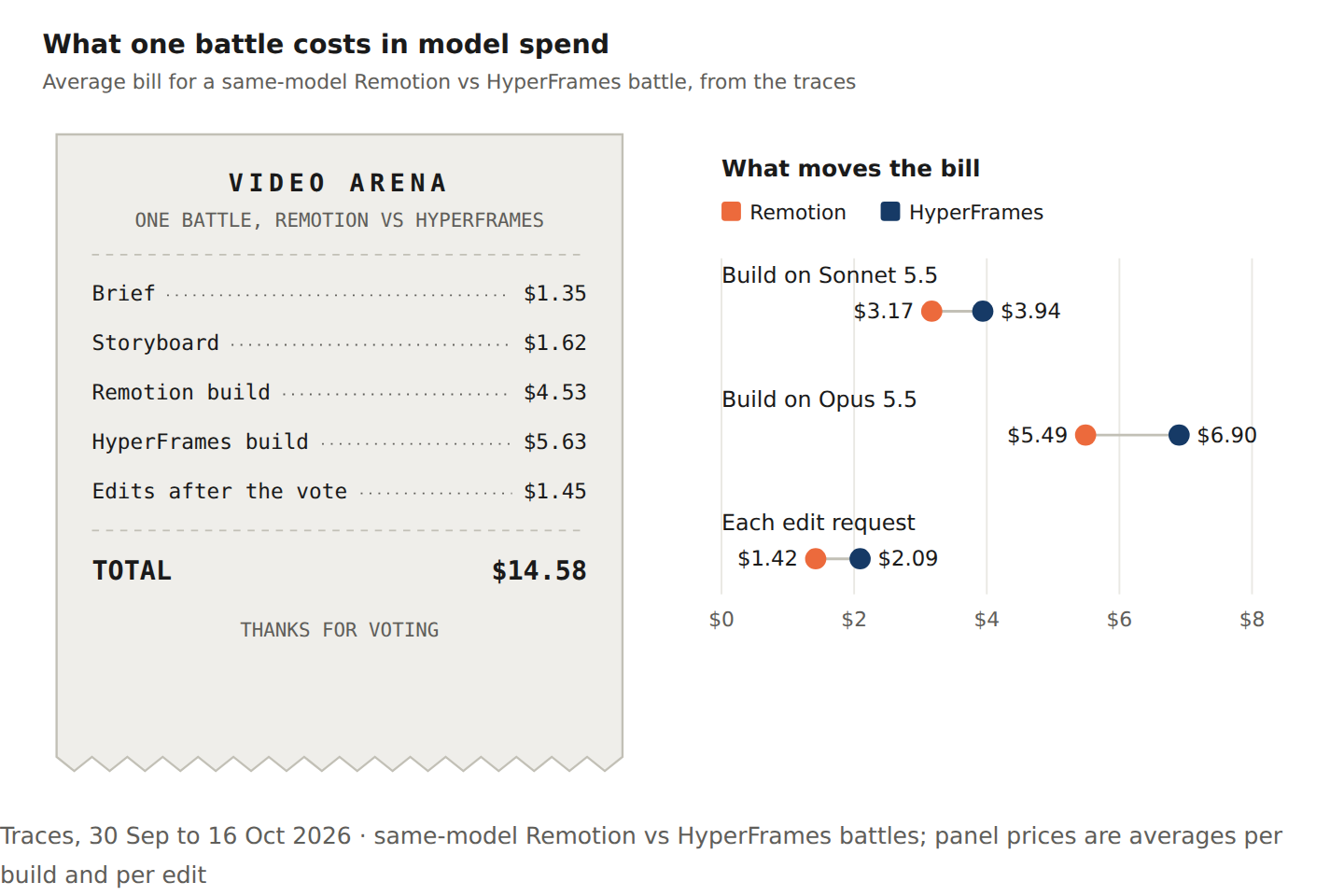
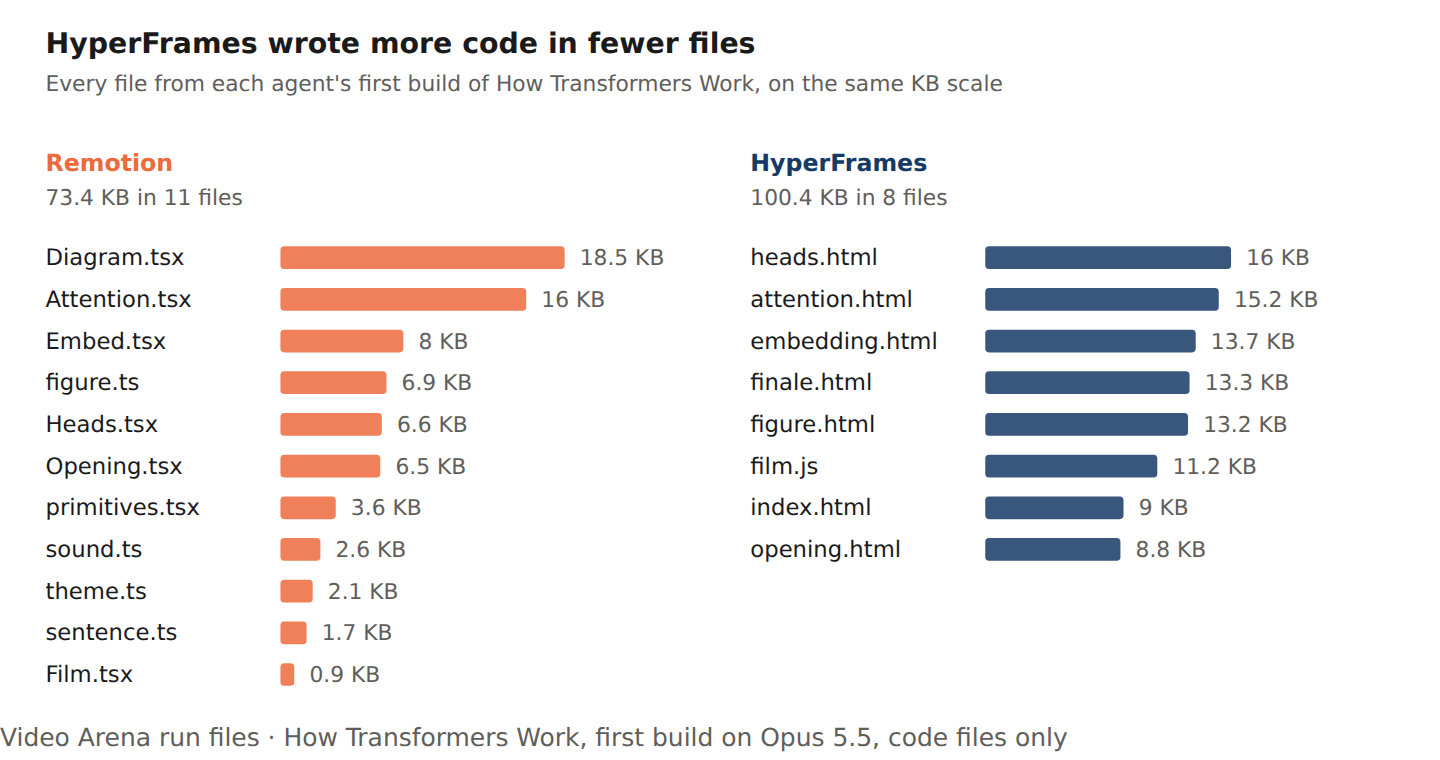
Part of the gap is the extra reading, since every page costs tokens. The rest is the shape of the code. On the Transformers film, Remotion wrote 73.4 KB of React across 11 files; HyperFrames wrote 100.4 KB of HTML, CSS and GSAP across 8. Across all builds, the biggest HyperFrames file averages 39 KB against 21 KB for Remotion. An agent re-reads a file every time it changes it, so every fix to a bigger file costs more, which is why edits cost 47% more.
Does the reading pay off?
It seems to. On Opus 5.5 the two coding harnesses are tied on the scoreboard (1060 against 1053), so the extra reading buys a competitive film. It just costs more time and money to get there, and the time is what breaks it on long films.
3. Text-heavy and vertical films break the pattern
Two kinds of film behave differently from the rest: films where words carry the story, and portrait (vertical) films.
Text-heavy films come down to tooling
On films told mostly in text, the two are close: Remotion leads 12 to 8, too few votes to call. The clear difference is in how they handle text. Remotion ships a guide for measuring text, and its measureText and fitText helpers work out how wide a line will be and shrink it to fit before anything is drawn. About a third of Remotion's builds on these films used it.
None of the HyperFrames builds measured text this way; they checked by eye instead, looking at more stills of their own film. They flag clipped text in 15% of builds, against 5% for Remotion. Checking after drawing catches some problems; measuring before drawing avoids them.
You'd think text would be the easy part for an agent that writes code, since the words are right there in the file. It isn't: getting a line of text to fit a frame is a layout problem, and agents only see the result through still frames.
Vertical films are close to a coin flip
On portrait films, Remotion against HyperFrames ended in a tie 52% of the time, against 17% on landscape (p≈0.0001, excluding one voter who called every vertical battle a tie). Our guess is that a tall frame only fits one thing at a time, so both harnesses end up making similar films.
That same constraint is where Motion does best (next section).
4. Where Motion shines
Motion, a video agent by Mosaic, gets the same brief and storyboard as the coding agents and makes the film as its own end-to-end product. Overall it trails, 18 wins to 49, all against Opus coding agents. But on the right kind of film it holds its own.
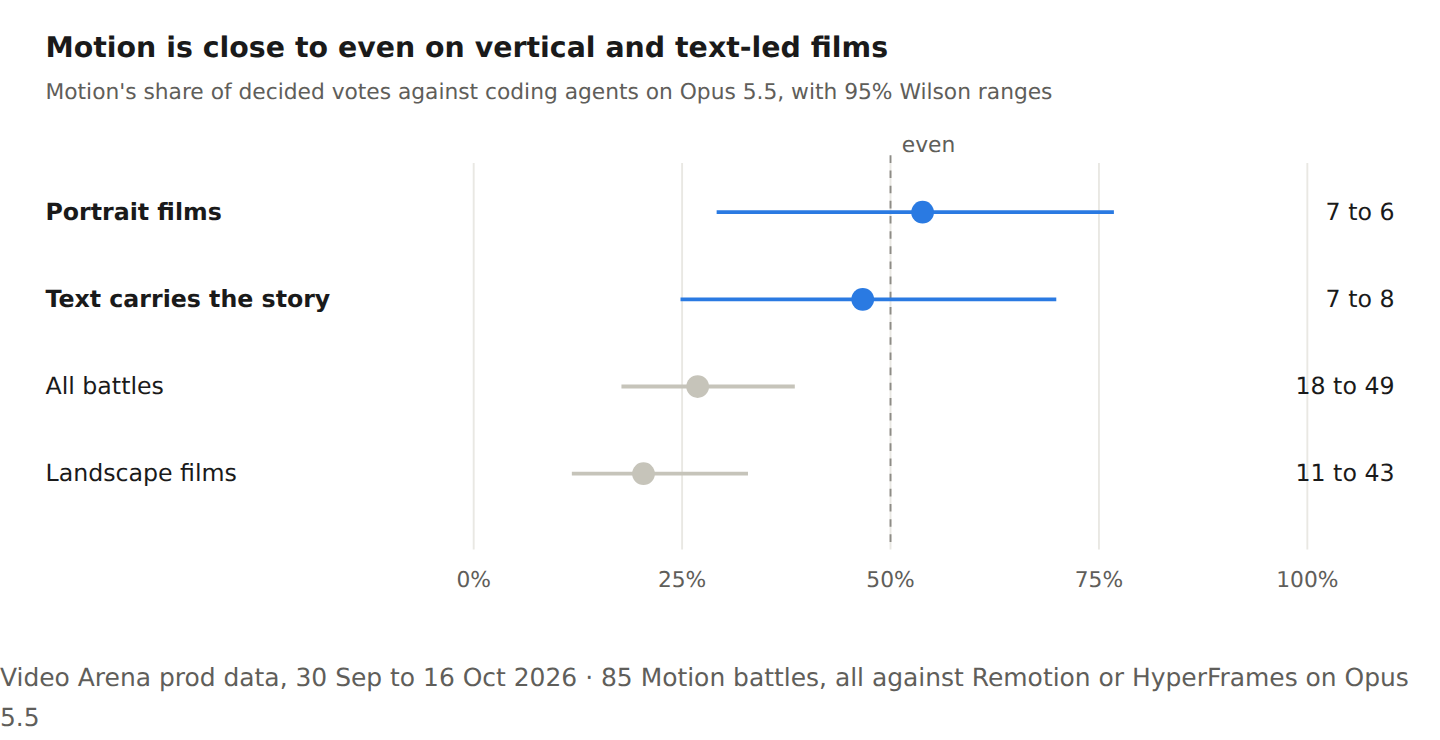
Portrait against landscape is a real difference (p≈0.03). The overall record also undersells Motion: 44 of its 117 builds failed, and 34 of those hit our 45-minute limit, a limit we set with coding agents in mind.
Where Motion wins
Many of its wins are films about one single idea: the types of beer, or an optical illusion called This Gray Isn't Actually Gray. Its text-led wins look similar: a 15-second brand film told as one chat thread, a 30-second type-led launch, and a 30-second text conversation the startup wrote out line by line. Each is essentially one screen that changes.
Motion's internals aren't visible to us, so our best explanation comes from the coding agents' side. A coding agent spends about a fifth of its run looking at stills of its own film. A film about one idea, or one screen, doesn't need that much checking, so the coding agents' biggest advantage matters less.
Full scripts help Motion most
Two of Motion's longest wins came from people who wrote full scripts. Both were two-minute explainers: one on a production RAG pipeline with pgvector and FastAPI, the other a leadership brief on AI workforce readiness. Each beat a coding agent on Opus.
The median arena prompt was 194 characters in week one (it has since grown to 779); these two were around 5,500 and 5,900. The RAG script marked every visual with a [GRAPHIC: ...] cue, down to the level of which process pulls from which queue. Since the storyboard comes from the prompt, a full script gives Motion far more to work with than a two-line ask. Our favourite result: a 47,000-character prompt written with Remotion in mind, where Motion's version won.
5. What people change after the vote
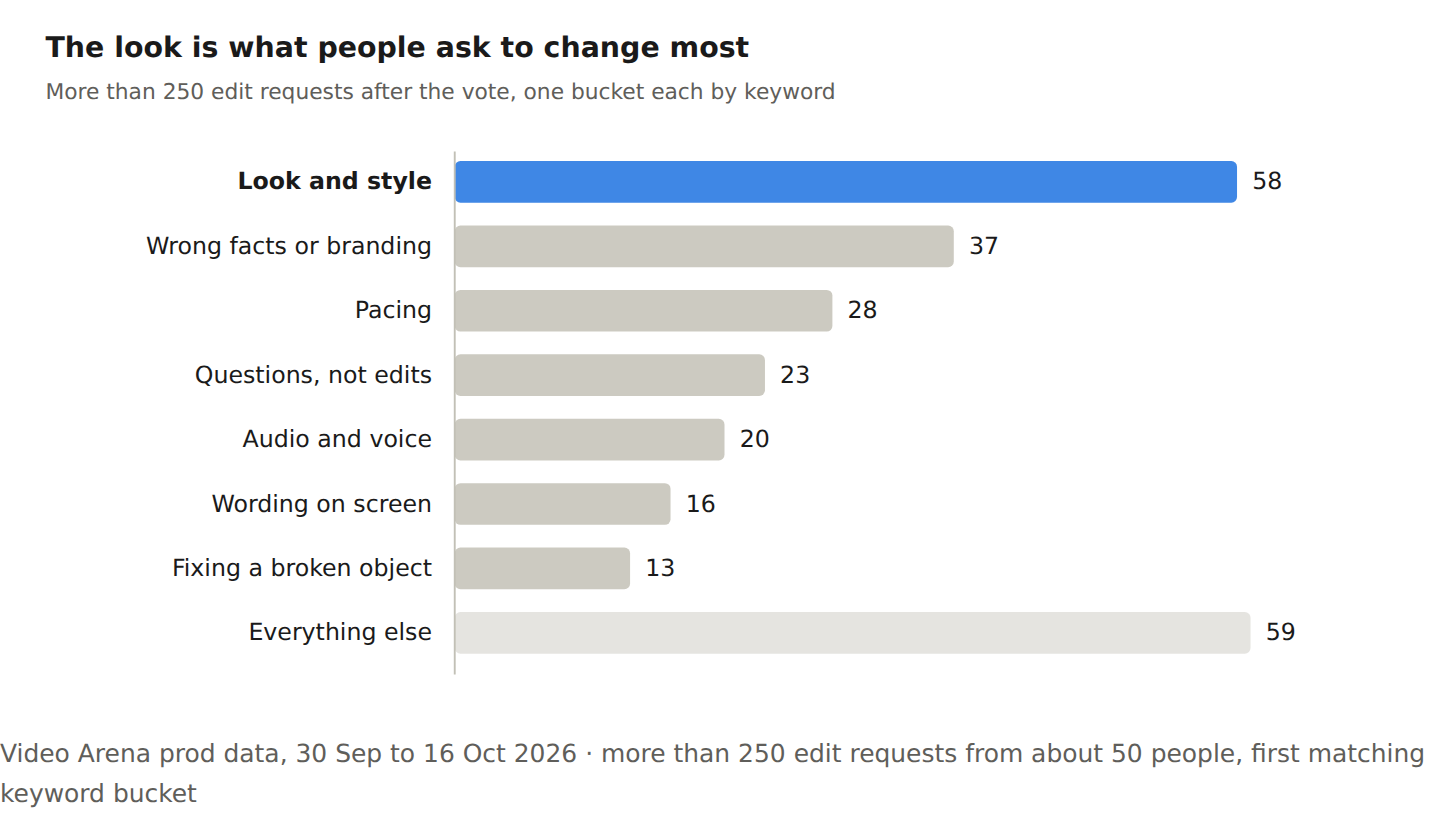
Picking a winner is rarely the end. About 50 people sent more than 250 edit requests after voting. The single biggest thing they ask to change is the look.
The look comes first
One cold chain startup asked for a 30-second illustrated film. Motion's build failed to finish, and they voted the Remotion film bad, but kept editing it because the flow looked okay, but the graphics felt generic, almost like a slide deck. Their ask: "I want a drawn world." They pushed through nine requests until one started with "looks good".
Coding agents default to shapes and icons unless told otherwise. "Hand drawn from scratch" tells an agent far more than "illustrated".
Wrong facts or branding come second. And some edits have nothing to do with animation at all. Someone running a beer class kept Motion's 90-second beer explainer, then asked for a welcome line, a reference removed, and their logo added. That kind of "make it mine" round can be skipped by putting your name and logo in the first prompt.
A few people do most of the editing
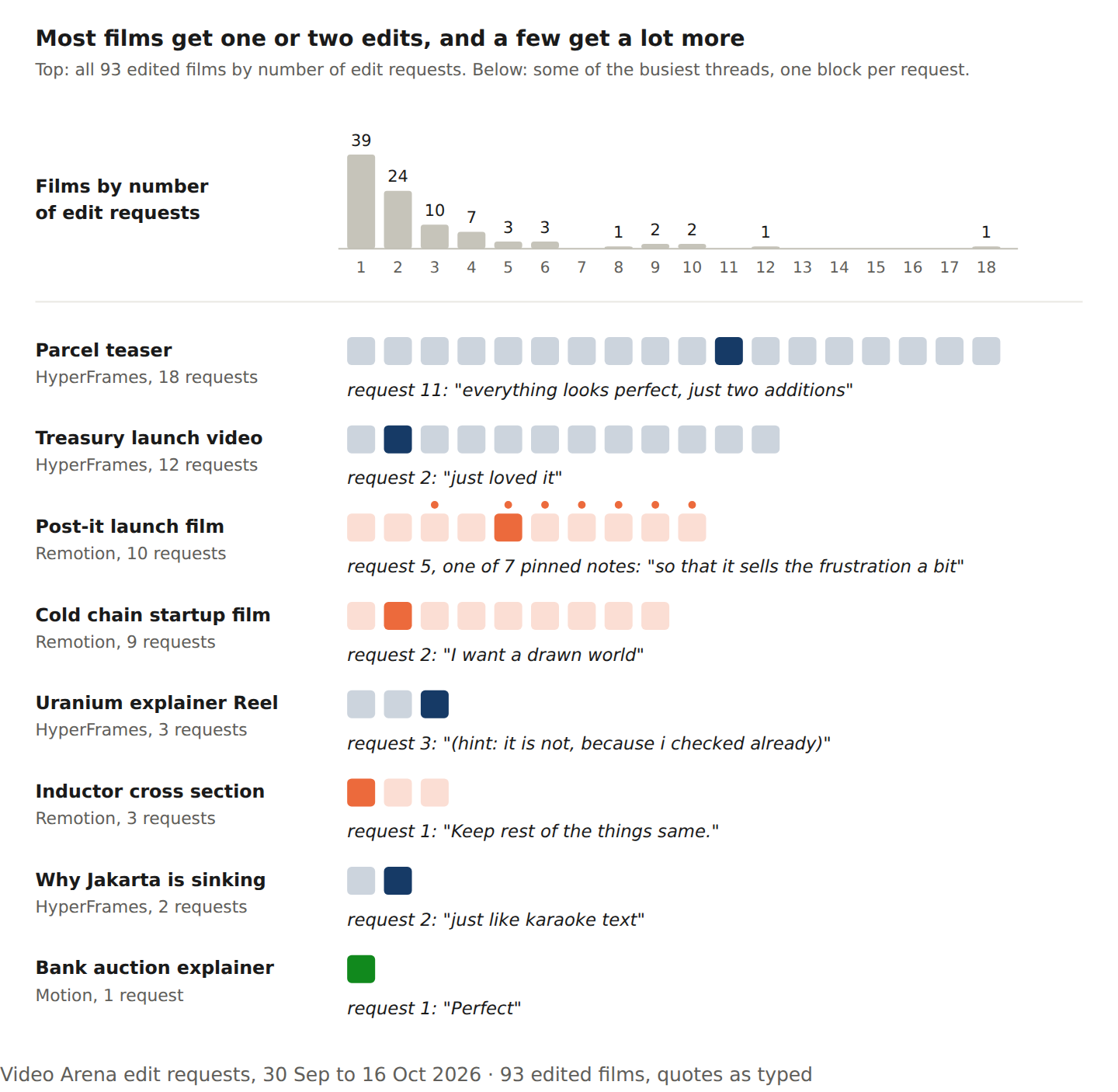
Editing effort is very uneven. Most edited films got one or two requests, but five people wrote over a third of all requests. A treasury startup sent 12 edits to a launch video it had already picked, adding hedging programs, netting and commodities, with "just loved it" early on. A teaser for a fragile parcel went through 18 edits; number 11 was "everything looks perfect, just two additions".
How we counted
The data comes from two weeks of Video Arena votes and agent logs, across more than 600 videos. Some splits are small, so treat those findings as directional rather than settled.